
Download
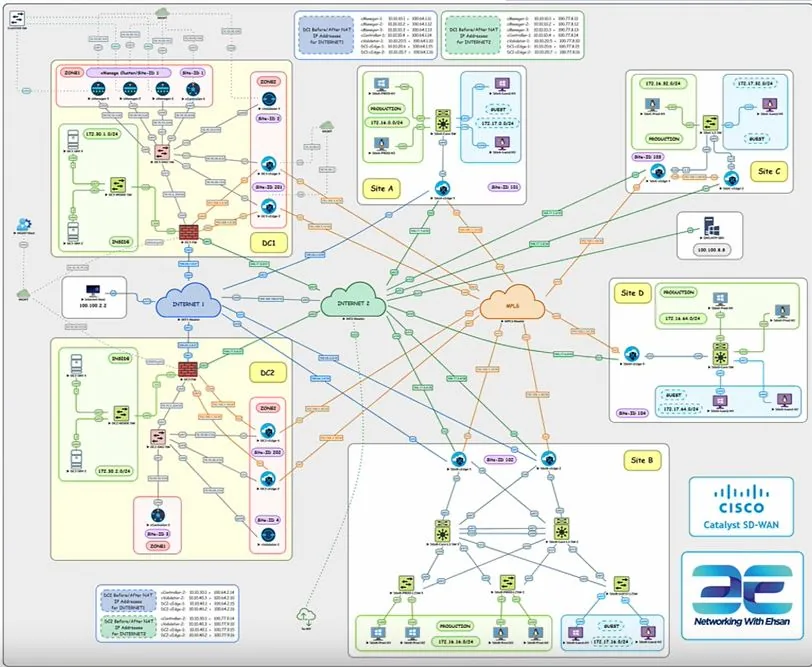
EVE-NG SD-WAN Lab Download
Download the complete EVE-NG SD-WAN lab topology and supporting lab resources for hands-on Cisco SD-WAN practice.
This lab is only importable on EVE-NG Pro/Learning Center editions
This download provides the EVE-NG SD-WAN lab topology and supporting lab resources, including the topology file and lab icons.
Cisco software images are not included in this download. The Cisco SD-WAN, C8000V, FMC, FTD, and IOL images listed below are requirements for running the lab and must already exist in your EVE-NG environment.
You must obtain Cisco software images through an authorized source.
Make sure the images folder below exist on your EVE-NG before importing the Lab:
| Component | Required Image / Version | Included in Download? | Purpose |
|---|---|---|---|
| vManage | vtmgmt-20.9.4.1 |
No | Cisco SD-WAN management controller |
| vBond | vtbond-20.9.4 |
No | Cisco SD-WAN orchestration controller |
| vSmart | vtsmart-20.9.4 |
No | Cisco SD-WAN control-plane controller |
| C8000V | c8000v-17.09.04a |
No | Cisco IOS XE SD-WAN edge router |
| Windows Workstation | Any Windows 10 image | No | Client workstation used in the lab |
| Windows Server | Windows Server 2016 or 2019 | No | Server workload used in the lab |
| Cisco FMC | Any compatible FMC 7.x image | No | Firewall Management Center |
| Cisco FTD | Any compatible FTD 7.x image | No | Cisco Secure Firewall Threat Defense |
| IOL L2 Switch | i86bi_linux_l2-adventerprisek9-ms.SSA.high_iron_20190423.bin |
No | Layer 2 switching inside the lab |
| IOL L3 Router | i86bi_LinuxL3-AdvEnterpriseK9-M2_157_3_May_2018.bin |
No | Layer 3 routing inside the lab |
How to Import the SD-WAN Lab into EVE-NG
Before importing the lab, make sure all required Cisco images listed above are already installed and available in your EVE-NG environment.
- Download the SD-WAN EVE-NG Pro Topology package from this page.
- Log in to your EVE-NG Pro or Learning Center web interface.
- From the EVE-NG main page, select the option to Import Lab.
- Select the downloaded EVE-NG topology ZIP file and import it. You do not need to extract the topology ZIP before importing it.
- Open the imported lab and verify that every node is associated with the correct image listed in the Required Images table above.
- If a node reports a missing image, install or map the required image before starting the lab.
- Start the lab nodes gradually and verify CPU and RAM usage before starting the complete topology.
Important: The lab topology does not include Cisco software images. Cisco images must be obtained separately through an authorized source.
vCPU (CPU Threads): 56
RAM: 110 GB
Disk: SSD (For good performance)
SD-WAN Lab icons for EVE-NG
SFTP/SCP to your EVE, copy all icons to this location: /opt/unetlab/html/images/icons
Continue Learning Cisco SD-WAN
After importing the lab, use the following guides to continue with Cisco SD-WAN configuration, monitoring, NAT, and upgrade scenarios.
- Deep Dive into Cisco SD-WAN — Explore a practical Cisco SD-WAN deployment scenario with controllers, edge devices, firewall integration, and NAT.
- Configure SNMP and NetFlow on Cisco SD-WAN — Learn how to enable monitoring and flow visibility in a Cisco SD-WAN environment.
- Cisco SD-WAN Upgrade Guide — Review the upgrade process and important considerations for Cisco SD-WAN components.
- Cisco SD-WAN NAT – Part 1 — Start with the fundamentals of NAT behavior and configuration in Cisco SD-WAN.
Frequently Asked Questions
Does this download include Cisco software images?
No. Cisco software images are not included in this download. The package contains the EVE-NG SD-WAN lab topology and supporting lab resources. Cisco images must be obtained separately through an authorized source.
Which EVE-NG edition is required?
This lab is designed for EVE-NG Pro or Learning Center editions. Make sure your EVE-NG environment supports importing the provided topology before using the lab.
Which Cisco SD-WAN versions are used in this lab?
The lab was built around Cisco SD-WAN 20.9.x components, including vManage, vBond, and vSmart, together with C8000V 17.09.x.
Do I need the IOL images listed on this page?
Yes, the topology uses the listed IOL L2 and IOL L3 images for switching and routing functions. These files are prerequisites and are not included in the download package.
Why does EVE-NG show a missing image error after importing the lab?
A missing image message normally means the image name expected by the topology does not exactly match an image installed in your EVE-NG environment. Compare the image name with the Required Images table above and either install or correctly map the required image.
Can I use newer Cisco SD-WAN or C8000V versions?
Newer versions may work, but compatibility is not guaranteed. If you use a different version, verify node templates, interfaces, boot settings, and configuration behavior before running the complete lab.
How much CPU and RAM does the full topology require?
The recommended resources for running all nodes are approximately 56 vCPU threads, 110 GB of RAM, and SSD storage. You can also start only the nodes required for a specific exercise to reduce resource usage.
Watch the Cisco SD-WAN Lab Walkthrough
If you want to see how the topology is used in practice, continue with the related Cisco SD-WAN training video and lab demonstration on YouTube.