
GRE tunnel in FTD
Cisco Secure Firewall Threat Defense (FTD) handles tunnel traffic differently depending on the action configured in the Prefilter Policy. In this article, we will examine how GRE and other non-encrypted tunnel traffic is processed using Fastpath, Block, Analyze, and Rezone.
The lab demonstrates how tunnel traffic can bypass Snort inspection, be completely blocked, be passed to the Access Control Policy for deep inspection, or be rezoned so that traffic inside the GRE tunnel can be controlled independently from normal traffic.
Quick Answer
Cisco FTD uses Prefilter Policy to process tunnel traffic such as GRE and IP-in-IP before normal Access Control Policy inspection. Fastpath bypasses Snort inspection, Block drops the tunnel, Analyze sends the tunnel traffic to Snort and ACP for inspection, and Rezone assigns the decapsulated traffic to another security zone so that more granular ACP rules can be applied.
Table of Contents
Prerequisites
Before following this lab, you should have a basic understanding of the following Cisco Secure Firewall technologies:
- Cisco Secure Firewall Threat Defense (FTD)
- Cisco Firewall Management Center (FMC)
- Access Control Policy (ACP)
- Security zones
- GRE tunnel configuration
- Basic packet-flow troubleshooting
The GRE tunnel used in this demonstration is established between two Cisco CSR routers, while Cisco FTD is positioned between the inside and DMZ networks.
Lab Topology
The following topology is used throughout this article.
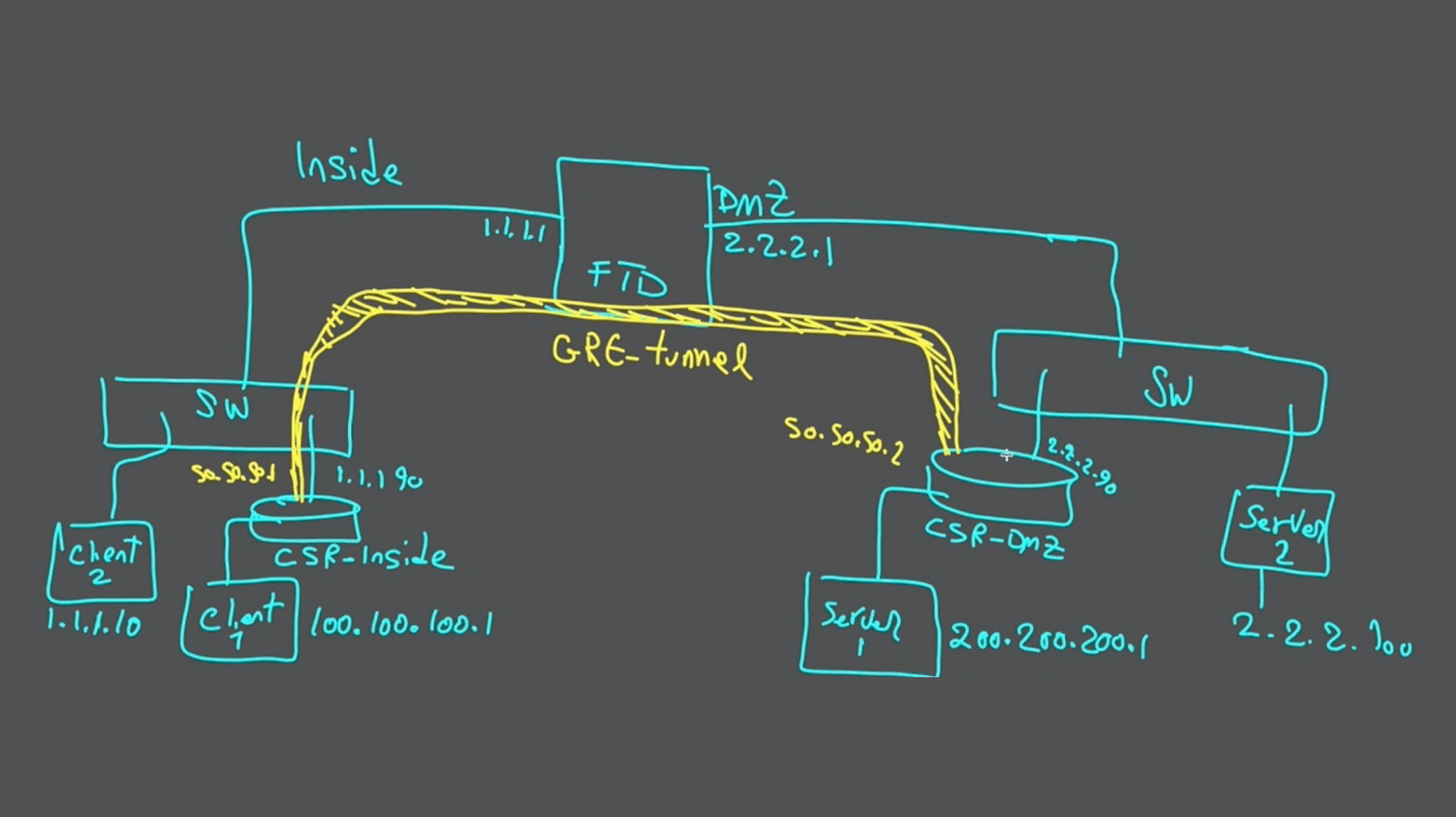
In this topology, one Cisco FTD firewall is located between two security zones:
- INSIDE
- DMZ
There are two clients and two servers.
- Client1 and Server1 communicate through the GRE tunnel.
- Client2 and Server2 communicate through the FTD without using the GRE tunnel.
The GRE tunnel itself is established between the two Cisco CSR routers.
Video Demonstration
The complete Cisco FTD Prefilter Policy and GRE tunnel demonstration is available in the following video.
GRE Tunnel Verification
Before configuring the FTD Prefilter Policy, we first verify that the GRE tunnel and the test hosts are operating correctly.
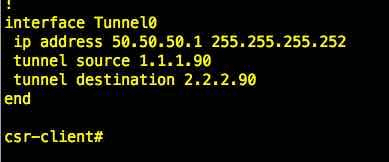
CSR Client-Side Tunnel Configuration
The following output shows the tunnel interface configuration on the CSR router located on the client side.
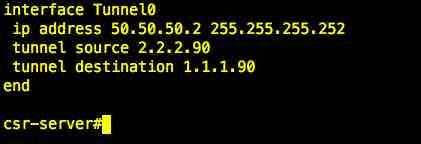
CSR DMZ-Side Tunnel Configuration
The following screenshot shows the tunnel interface configuration on the CSR router located on the DMZ side.
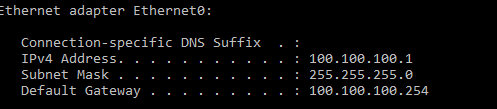
Verify Client1
Next, we verify the IP address assigned to Client1.
We then perform a traceroute from Client1 to Server1. This traffic is expected to pass through the GRE tunnel.
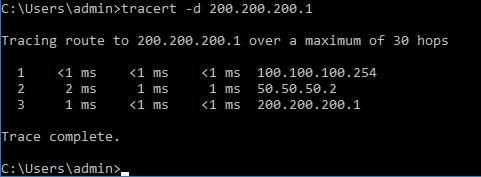
The traffic passes through 50.50.50.2, which is the tunnel-interface IP address of the CSR router in the DMZ.
Verify Client2
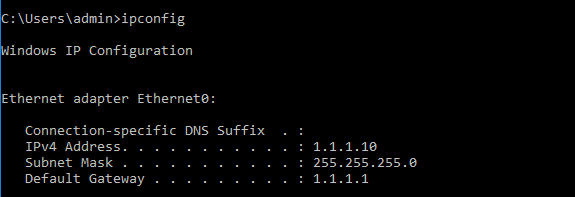
We also verify the IP address of Client2.
Now perform a traceroute from Client2 to Server2.
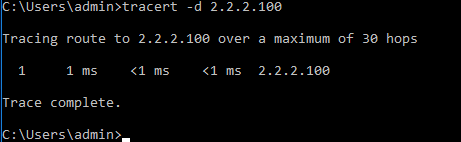
As expected, Client2 traffic does not use the GRE tunnel.
Cisco FTD Prefilter Policy
We can now move to Cisco Firewall Management Center and configure how the FTD handles GRE traffic.
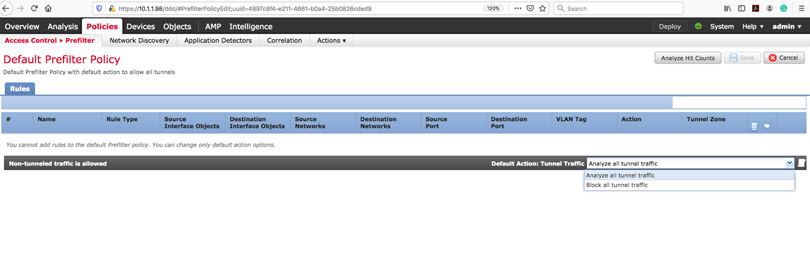
Cisco FTD has a default Prefilter Policy. Rules cannot be added directly to the default policy, but its default action can be changed.
By default, the action is:
Analyze all tunnel traffic.
It can also be changed to:
Block all tunnel traffic.
What Does Analyze Mean?
When the Prefilter Policy action is Analyze, FTD passes the tunnel traffic into the Snort inspection engine. This allows the traffic to continue into the Access Control Policy where more granular security rules can be applied.
Create a Prefilter Policy
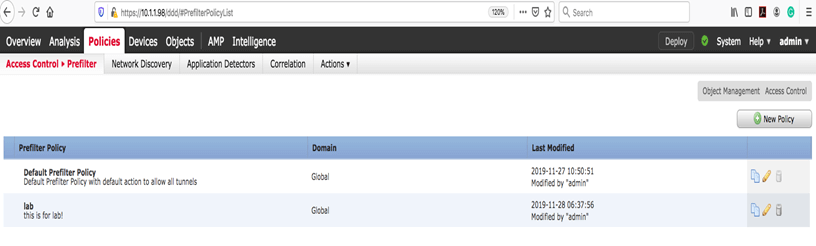
The first step is to create a Prefilter Policy for the GRE traffic.
Navigate to:
Policies > Prefilter > New Policy
Create a Tunnel Rule
The next step is to create a tunnel rule inside the Prefilter Policy.
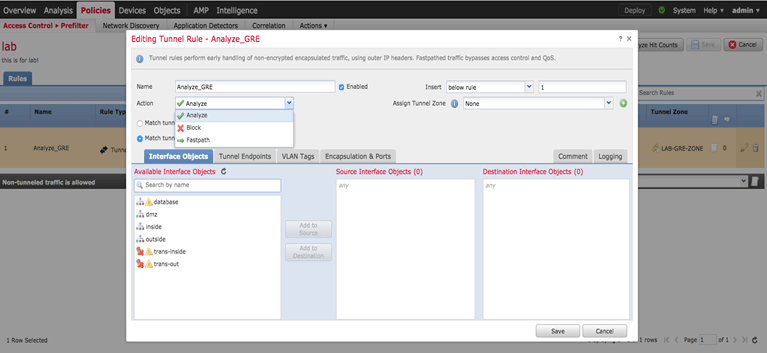
This type of tunnel rule applies to supported non-encrypted tunnel traffic. Review the Encapsulation & Ports tab when defining the rule.
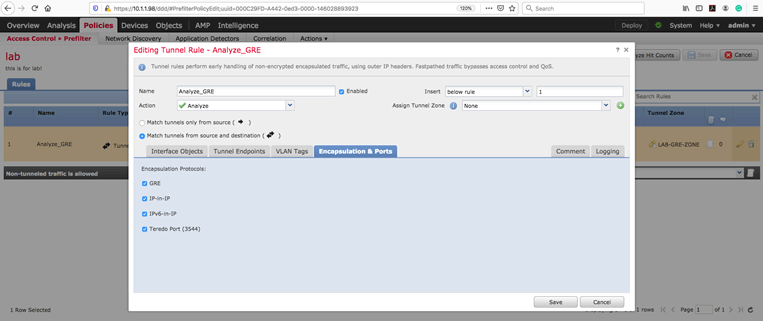
The tunnel rule provides three primary actions:
- Fastpath
- Block
- Analyze
We will test each action separately.
Fastpath
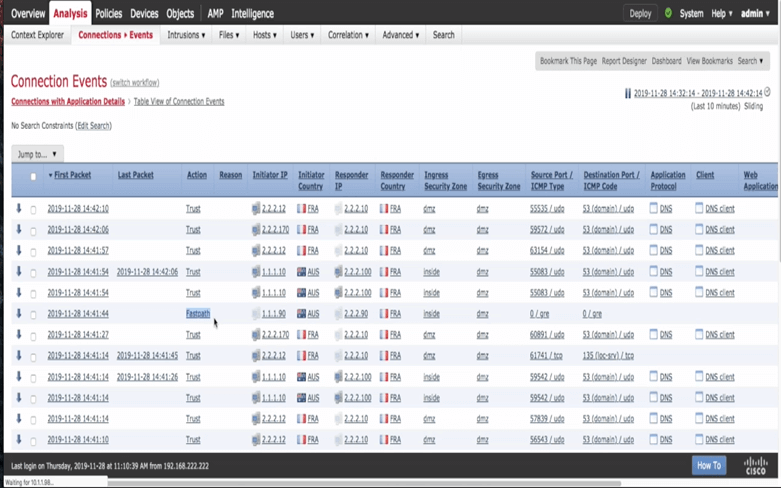
The Fastpath action allows matching tunnel traffic to bypass the Snort inspection engine.
When Fastpath is used, the connection event shows that the traffic was fastpathed rather than inspected by the normal Access Control Policy processing path.
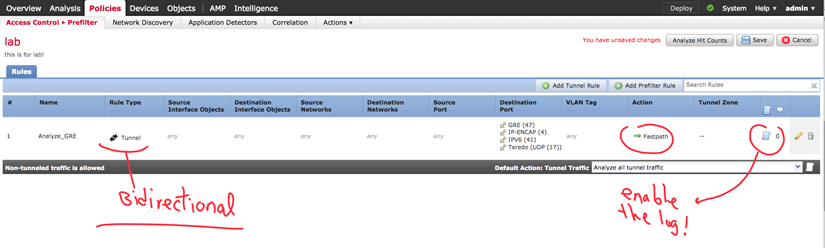
The same behavior can also be observed in the FTD packet-processing path.

Next, traffic is generated from Client1, which is located behind the GRE tunnel.
Block
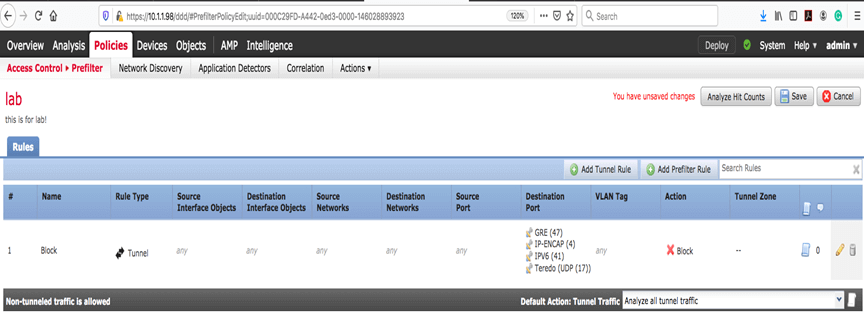
Next, we change the Prefilter Policy action to Block.
This blocks the GRE tunnel itself rather than simply blocking an individual application transported inside the tunnel.
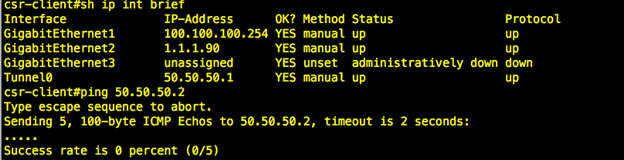
Because the GRE packets are blocked, we expect the tunnel between the CSR routers to stop functioning.
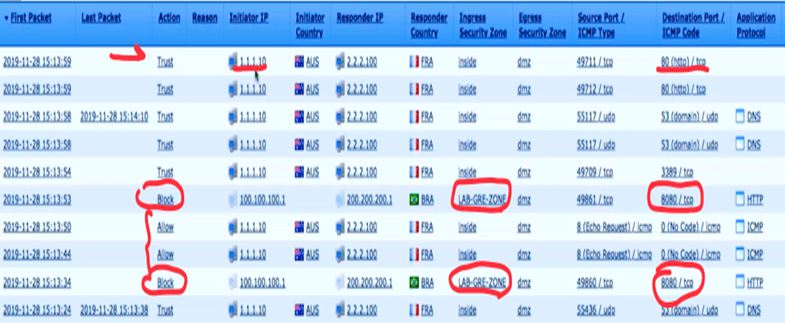
The connection event in FMC also reports the blocked tunnel traffic.
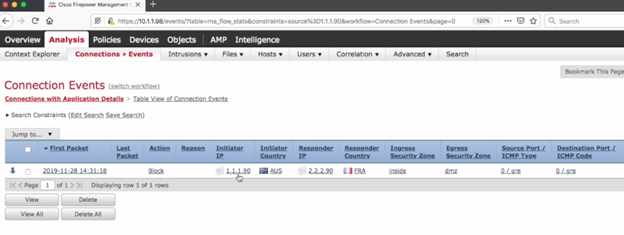
Notice again that the event identifies the outer GRE tunnel addresses.
Analyze
With Analyze, FTD sends the tunnel traffic through the normal Snort inspection path.
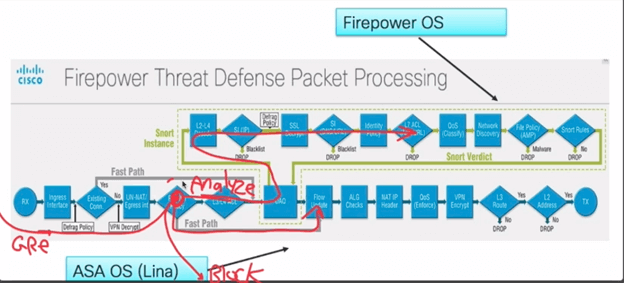
We now configure the GRE traffic to use the Analyze action. Analyze is also the default behavior for tunnel traffic in the default Prefilter Policy.
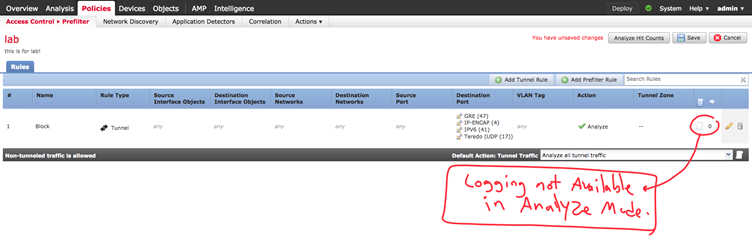
Important: When Analyze is selected for the tunnel traffic, Prefilter logging is not available in the same way as Fastpath or Block because the traffic continues to the Access Control Policy.
Filtering Traffic Inside the GRE Tunnel
We can now generate several types of traffic through the GRE tunnel and inspect how the Access Control Policy handles them.
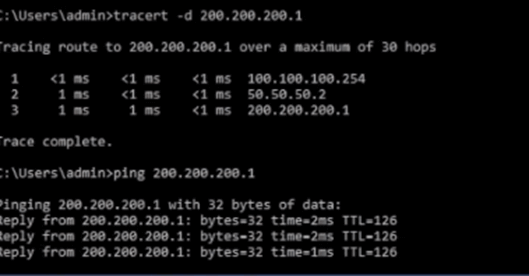
ICMP Test
First, generate ICMP traffic using ping.
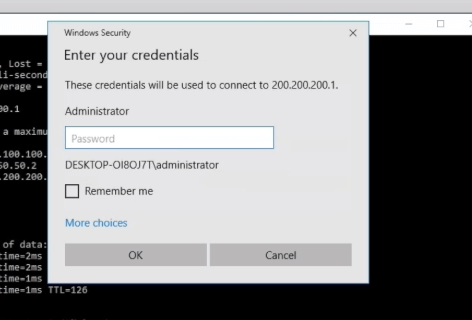
RDP Test
Next, start an RDP session to Server1.
HTTP Test
Finally, open a web page hosted on Server1 using TCP port 8080.
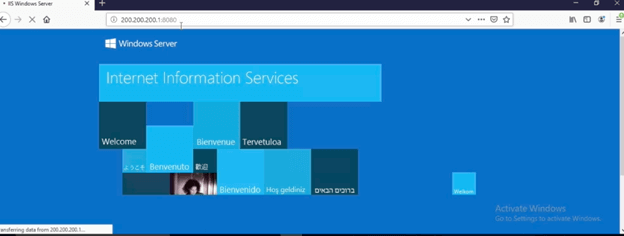
The resulting connection events can now be reviewed in FMC.
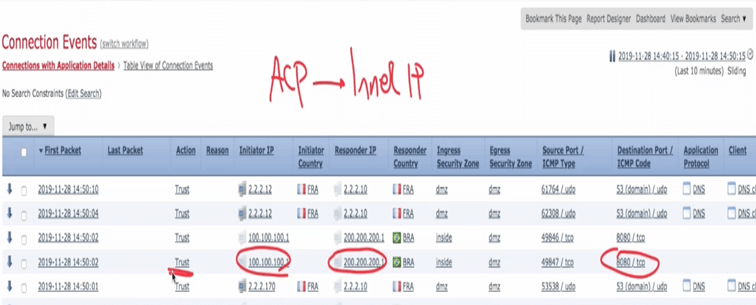
Unlike Fastpath, the analyzed traffic exposes the inner source and destination addresses to the Access Control Policy. We can therefore see the actual Client1 and Server1 IP addresses.
Apply Application-Level Filtering
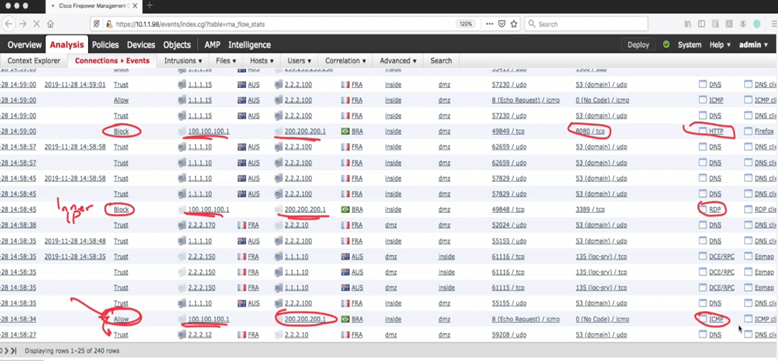
We now create an ACP rule that blocks RDP and HTTP traffic while allowing ICMP.
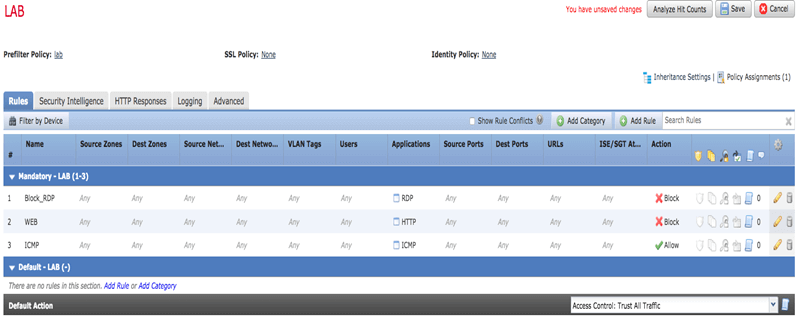
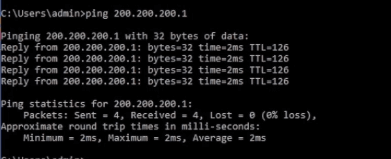
Verify ICMP
ICMP remains permitted.
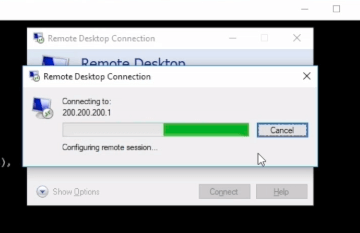
Verify RDP
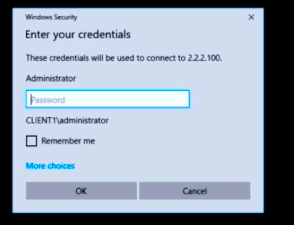
RDP no longer works because it is blocked by the Access Control Policy.
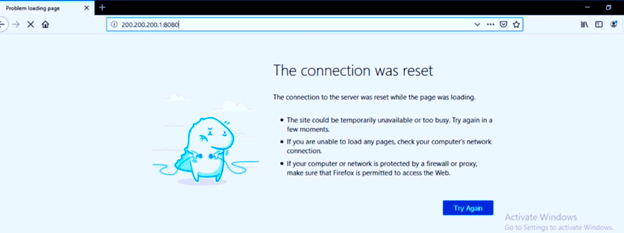
Verify HTTP
The web connection is also blocked as expected.
We can verify the results again from the FMC connection events.
Rezone
There is an important limitation with the previous configuration.
If we create an ACP rule that blocks RDP based only on the normal security zones, the rule can also affect hosts such as Client2 that are not behind the GRE tunnel.
If our requirement is to apply a policy only to traffic that originated from inside the GRE tunnel, we need a way to distinguish that traffic.
The solution is Rezone.
The Prefilter Policy Rezone action assigns the decapsulated tunnel traffic to another security zone. The Access Control Policy can then reference this zone and apply policies specifically to traffic coming from inside the tunnel.
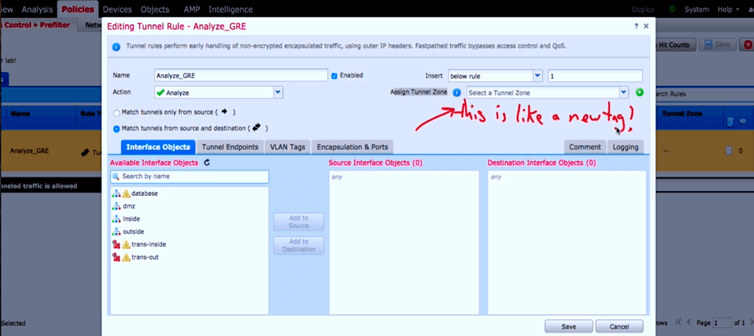
The new zone can now be referenced in the Access Control Policy so that the rule applies only to traffic originating from behind the GRE tunnel.
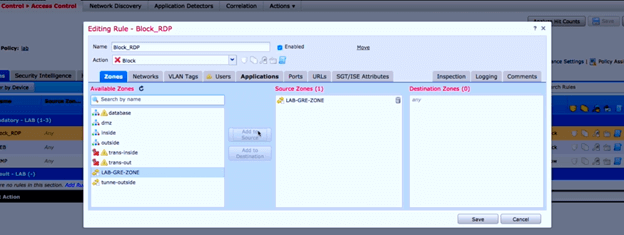
The resulting Access Control Policy rules appear as follows.
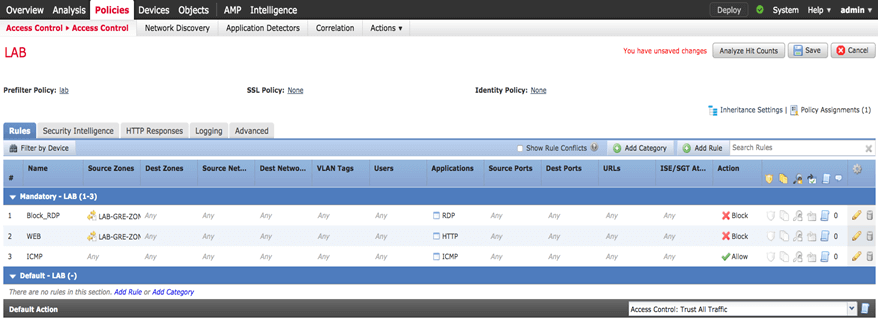
We can now filter traffic from Client1 behind the GRE tunnel without affecting Client2.
Final Verification
Client1 is tested again. ICMP remains permitted while RDP is blocked.

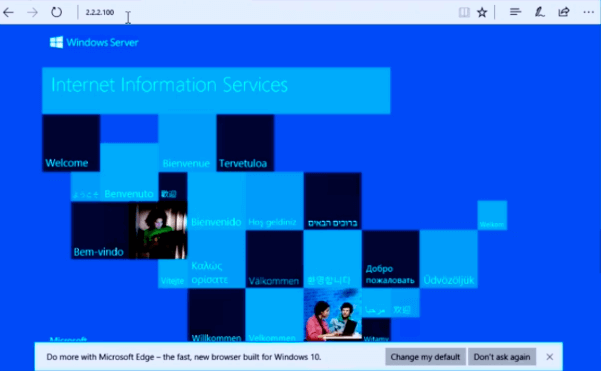
At the same time, Client2 is not behind the GRE tunnel and can still establish RDP and HTTP connections.
Client2 can also browse the Server2 web page successfully.
For final verification, check the FMC connection events.
Configuration Summary
| Prefilter Action | Behavior | Snort / ACP Inspection | Address Visibility |
|---|---|---|---|
| Fastpath | Allows matching tunnel traffic to bypass normal inspection | No normal Snort inspection | Outer tunnel addresses |
| Block | Blocks the tunnel traffic | No | Outer tunnel addresses |
| Analyze | Passes the traffic to normal inspection | Yes | Inner traffic can be inspected |
| Rezone | Assigns decapsulated traffic to another security zone | Yes | Inner traffic can be filtered using the new zone |
Conclusion
Cisco FTD Prefilter Policy provides an important control point for tunnel traffic before normal Access Control Policy processing.
Fastpath is useful when tunnel traffic should bypass Snort inspection, while Block can prevent the tunnel from operating entirely. Analyze provides deeper inspection by passing the traffic into Snort and the Access Control Policy, allowing the inner GRE traffic to be filtered based on applications, ports, source addresses, and destination addresses.
Rezone provides even more control by allowing decapsulated GRE traffic to be treated as traffic from a separate security zone. This makes it possible to apply security policies specifically to hosts behind the GRE tunnel without affecting other hosts that use the same physical FTD interfaces.
Download the GRE Tunnel in FTD PDF
You can also download the PDF version of this Cisco FTD GRE tunnel and Prefilter Policy lab for offline reference.