
Single BGP Session - Multi Address Families
In this article, you will learn how Multiprotocol BGP can use a single BGP session to exchange routes for both the IPv4 unicast and IPv6 unicast address families.
The lab begins with separate IPv4 and IPv6 BGP neighbor relationships. We then modify the configuration so that one IPv4-based BGP transport session carries routing information for both address families.
Table of Contents
Lab Topology
The topology contains two routers, R1 and R2, connected through a single physical link.
The link has both IPv4 and IPv6 addressing:
- IPv4 network:
10.10.10.0/24 - IPv6 network:
2001:1111::/64
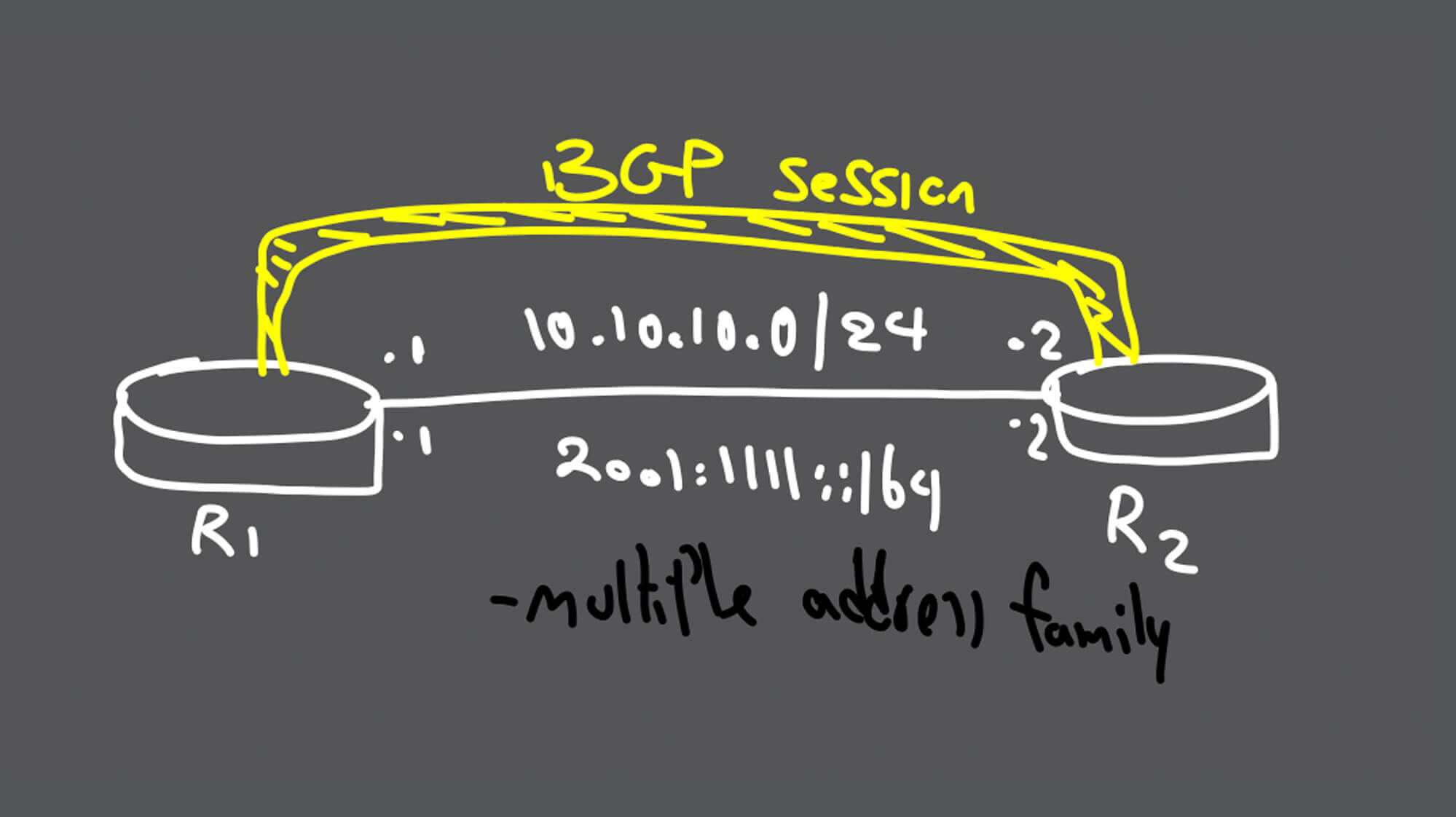
IPv4 and IPv6 Interface Addressing
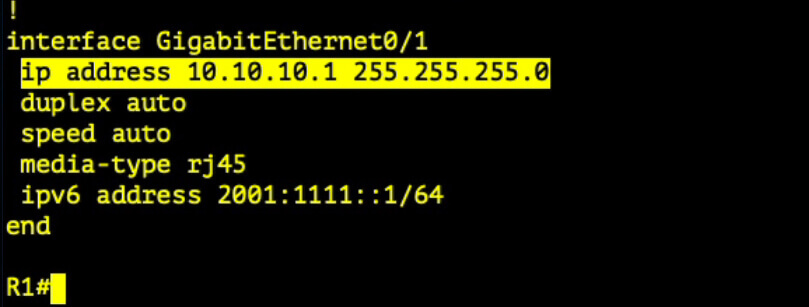
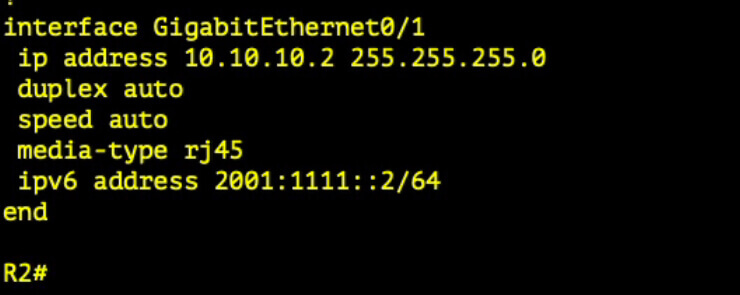
Both routers have an IPv4 address and an IPv6 address configured on interface GigabitEthernet0/1.
R1 Interface Configuration
R2 Interface Configuration
Preparing BGP for Multiple Address Families
The first important command is:
no bgp default ipv4-unicastBy default, a newly configured BGP neighbor is automatically activated for the IPv4 unicast address family on many Cisco IOS platforms.
The command above disables that automatic behavior. Each neighbor must then be explicitly activated under the required address family.
This makes the BGP configuration clearer when using multiple address families such as:
- IPv4 unicast
- IPv6 unicast
- VPNv4
- VPNv6
- Other Multiprotocol BGP address families
Initial Design: Separate IPv4 and IPv6 Sessions
In the initial configuration, R1 and R2 establish one neighbor relationship using their IPv4 addresses and another using their IPv6 addresses.
The general configuration process is:
- Configure the BGP process and local autonomous-system number.
- Define the IPv4 neighbor and remote AS.
- Define the IPv6 neighbor and remote AS.
- Create the IPv4 unicast address family.
- Activate the IPv4 neighbor under IPv4 unicast.
- Create the IPv6 unicast address family.
- Activate the IPv6 neighbor under IPv6 unicast.
Complete Initial Configuration
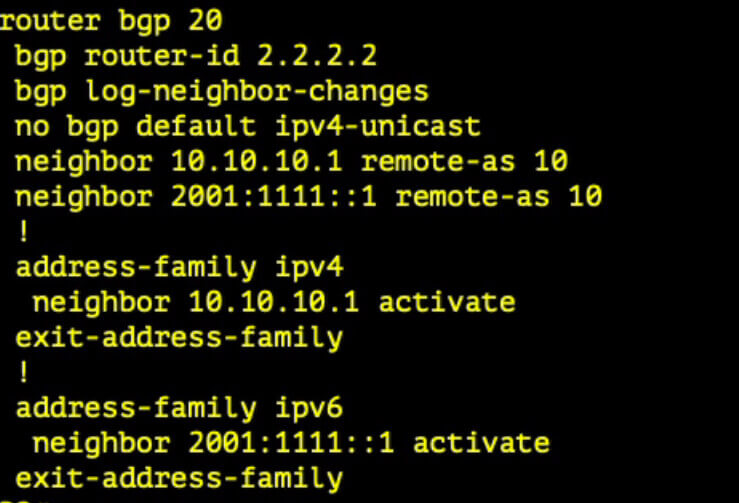
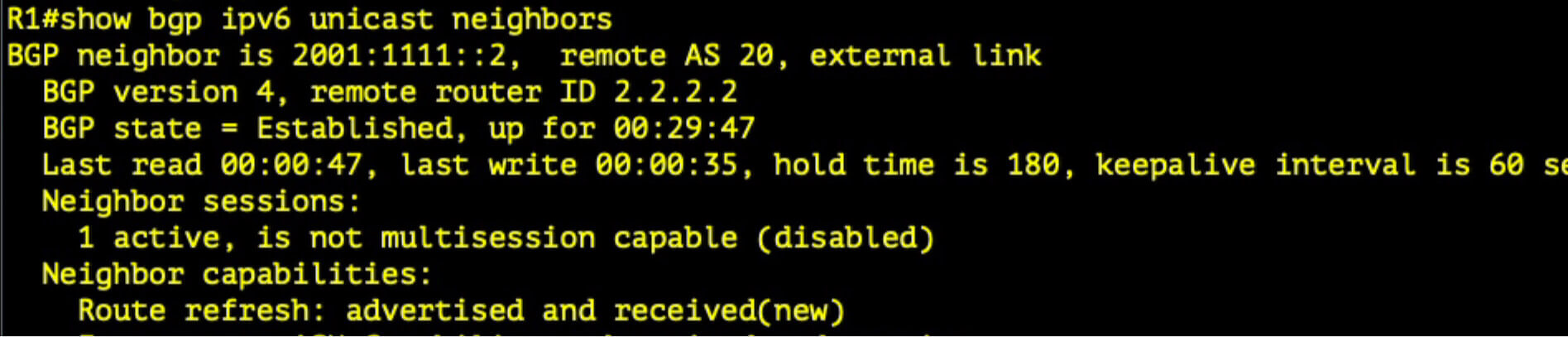
With this design, the routers maintain two BGP transport sessions:
- One session using the IPv4 neighbor address
- One session using the IPv6 neighbor address
Initial Verification

Single BGP Session for IPv4 and IPv6
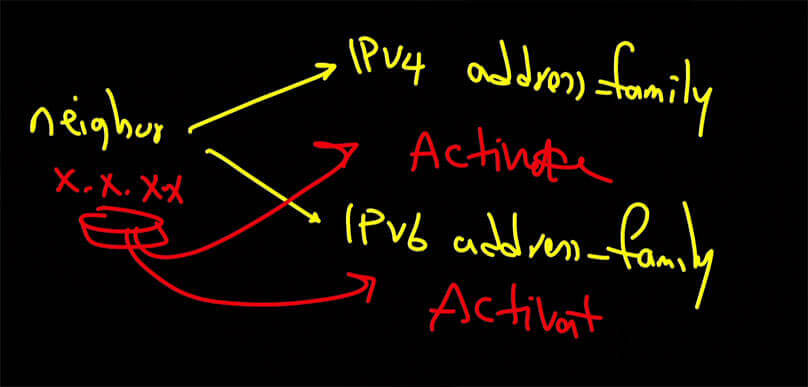
We can simplify the design by using one BGP neighbor relationship as the transport session and activating that same neighbor under both the IPv4 and IPv6 address families.
In this example, the IPv4 neighbor address is used to establish the TCP session. The same neighbor is then activated under:
- IPv4 unicast
- IPv6 unicast
The result is one BGP session carrying Network Layer Reachability Information for both address families.
This is a Multiprotocol BGP design. The address family used for the transported routes does not have to match the IP version used to establish the underlying BGP TCP session.
IPv6 Next-Hop Configuration
Step 1: Create a Route Map
When IPv6 routes are advertised through the IPv4-based neighbor session, the IPv6 routes still require a valid IPv6 next-hop address.
The route map sets the IPv6 next hop to the local IPv6 address configured on GigabitEthernet0/1.

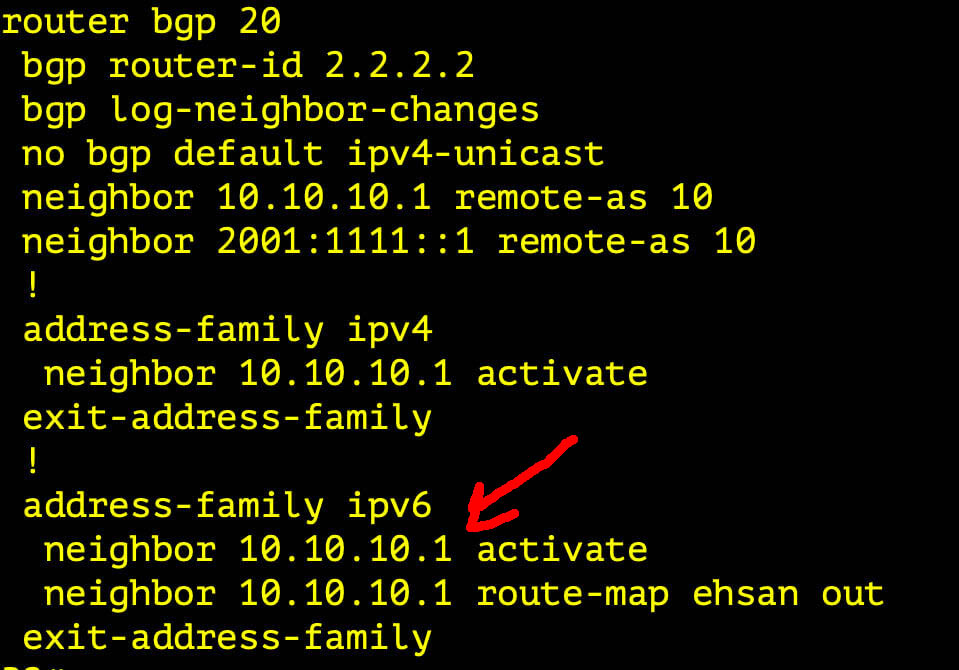
Step 2: Activate the IPv4 Neighbor Under IPv6 Unicast
Under the IPv6 unicast address family, use the IPv4 neighbor address instead of creating a separate IPv6 neighbor.
Apply the route map to the IPv4 neighbor in the outbound direction so that advertised IPv6 routes contain the correct IPv6 next hop.
Verification
After applying the new configuration, verify that only one BGP transport session exists between R1 and R2.
Also confirm that:
- The IPv4 neighbor is established.
- The neighbor is activated under IPv4 unicast.
- The same neighbor is activated under IPv6 unicast.
- IPv4 routes are exchanged successfully.
- IPv6 routes are exchanged successfully.
- The IPv6 routes contain a reachable IPv6 next hop.


Useful Verification Commands
show bgp ipv4 unicast summary
show bgp ipv6 unicast summary
show bgp ipv4 unicast
show bgp ipv6 unicast
show bgp ipv6 unicast <prefix>
show tcp brief
The BGP summary commands confirm the neighbor status for each address family, while the TCP information helps verify that the address families are using the same underlying transport session.
Video Demonstration
The following video demonstrates the complete configuration and verification process.
Conclusion
Multiprotocol BGP allows one neighbor session to exchange routes for multiple address families.
In this lab, the IPv4 neighbor address establishes the BGP transport session. That neighbor is activated under both IPv4 unicast and IPv6 unicast, allowing one session to carry both IPv4 and IPv6 routing information.
The important distinction is between the transport session and the exchanged address families. A session established over IPv4 can still carry IPv6 Network Layer Reachability Information when the required address family and next-hop behavior are configured correctly.
Related Reading
- Cisco BGP Route Reflector – Part 1 — Learn how route reflectors reduce the iBGP full-mesh requirement.
- Cisco BGP Route Reflector – Part 2 — Continue the route-reflector configuration and verification process.